Configuration System
Veeksha uses a flexible polymorphic configuration system that supports YAML files, CLI arguments, and programmatic access. This guide explains how the system works and how to navigate it effectively.
Configuration methods
- YAML Files (recommended)
Create a
.veeksha.ymlfile with your configuration:seed: 42 client: type: openai_chat_completions api_base: http://localhost:8000/v1 model: my-model traffic_scheduler: type: rate interval_generator: type: poisson arrival_rate: 10.0
- CLI Arguments
Override any option using dot notation:
uvx -p 3.14t veeksha benchmark \
    --client.api_base http://localhost:8000/v1 \
    --traffic_scheduler.interval_generator.arrival_rate 20.0
Argument names mirror the YAML hierarchy with dots.
- Combined (YAML + CLI)
CLI arguments override YAML values:
# Base config from file, override arrival rate
uvx -p 3.14t veeksha benchmark \
    --config base.veeksha.yml \
    --traffic_scheduler.interval_generator.arrival_rate 30.0
Polymorphic options
Many options have a type field that selects a variant with its own options:
# Session generator can be: synthetic, trace, or lmeval
session_generator:
  type: synthetic        # Selects synthetic variant
  session_graph:         # Options specific to synthetic
    type: linear
  channels:
    - type: text

# Traffic scheduler can be: rate or concurrent
traffic_scheduler:
  type: rate             # Selects rate variant
  interval_generator:    # Options specific to rate
    type: poisson
    arrival_rate: 10.0
Each type exposes different options. See the Configuration Reference for the full list.
Exporting JSON schema
Export a JSON schema for YAML IDE autocompletion and linting:
uvx -p 3.14t veeksha benchmark --export-json-schema veeksha-schema.json
Configure your IDE to use this schema. In VSCode and forks:
// .vscode/settings.json
{
    "yaml.schemas": {
        "./veeksha-schema.json": "*.veeksha.yml"
    },
    "yaml.customTags": [
        "!expand sequence"
    ]
}
Hint
The YAML IDE extension may be required for “yaml.schemas” to show up as a valid setting.
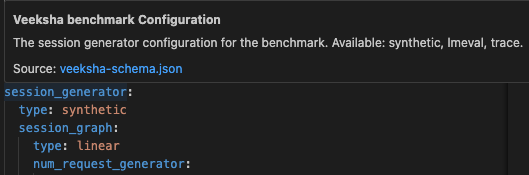
The VSCode YAML extension providing autocompletion and documentation on hover.
Common configuration sections
client - API endpoint configuration
client:
  type: openai_chat_completions
  api_base: http://localhost:8000/v1
  model: meta-llama/Llama-3-8B-Instruct
  # api_key: optional, falls back to OPENAI_API_KEY env var
  request_timeout: 300
  max_tokens_param: max_completion_tokens
  min_tokens_param: min_tokens
traffic_scheduler - Traffic pattern
# Rate-based
traffic_scheduler:
  type: rate
  interval_generator:
    type: poisson
    arrival_rate: 10.0
  cancel_session_on_failure: true

# OR Concurrency-based
traffic_scheduler:
  type: concurrent
  target_concurrent_sessions: 8
  rampup_seconds: 10
session_generator - Content generation
session_generator:
  type: synthetic
  session_graph:
    type: linear
    num_request_generator:
      type: uniform
      min: 1
      max: 5
    inherit_history: true
  channels:
    - type: text
      body_length_generator:
        type: uniform
        min: 100
        max: 500
  output_spec:
    text:
      output_length_generator:
        type: uniform
        min: 50
        max: 200
runtime - Execution parameters
runtime:
  benchmark_timeout: 300      # Total benchmark duration
  max_sessions: 1000          # Maximum sessions (-1 = unlimited)
  post_timeout_grace_seconds: 10  # Wait for in-flight after timeout
  num_client_threads: 3       # Async HTTP client threads
evaluators - Metrics collection
evaluators:
  - type: performance
    target_channels: ["text"]
    stream_metrics: true
    slos:
      - name: "P99 TTFC"
        metric: ttfc
        percentile: 0.99
        value: 0.5
        type: constant
Environment variables
Veeksha automatically reads certain environment variables as fallbacks when configuration values are not explicitly set:
OPENAI_API_KEYUsed as the API key if
client.api_keyis not set in config.OPENAI_API_BASEUsed as the API base URL if
client.api_baseis not set in config.
This allows you to set credentials once in your environment:
export OPENAI_API_KEY=your-api-key
export OPENAI_API_BASE=http://localhost:8000/v1
Then omit them from your config file:
# No need to specify api_key or api_base
client:
  type: openai_chat_completions
  model: meta-llama/Llama-3-8B-Instruct
This is especially useful for:
Avoiding committing secrets to version control
Sharing configs across environments with different servers
Veeksha also reads HF_TOKEN from the environment in order to access gated models.
Stop conditions
Benchmarks stop when either condition is met:
runtime:
  benchmark_timeout: 300    # Stop after 300 seconds
  max_sessions: 1000        # OR after 1000 sessions
Use -1 for unlimited:
runtime:
  benchmark_timeout: -1     # Run indefinitely
  max_sessions: 500         # Stop only after 500 sessions
When a timeout hits, Veeksha will record all in-flight requests and keep dispatching sessions as usual.
Then, it will exit after post_timeout_grace_seconds have passed, only if the session limit is not reached before that.
runtime:
  benchmark_timeout: 60
  post_timeout_grace_seconds: 10  # Wait 10s for in-flight requests
  # -1 = wait indefinitely for all in-flight
  # 0 = exit immediately (cancel in-flight)
Output directory
Control where results are saved:
output_dir: benchmark_output
Results are saved to a timestamped subdirectory:
benchmark_output/
└── 09:01:2026-10:30:00-a1b2c3d4/
    ├── config.yml
    ├── metrics/
    └── traces/
The subdirectory name includes:
Date and time
Short hash of the configuration (for uniqueness)
Trace recording
Control what’s recorded for debugging:
trace_recorder:
  enabled: true          # Write trace file
  include_content: false # Exclude prompt/response content (smaller files)
Set include_content: true to record full request content for debugging.
Validation
Veeksha validates configurations at startup:
Type checking for all fields
Enum validation for
typefieldsRequired field checking
Cross-field validation (e.g.,
min <= max)
Invalid configurations produce clear error messages:
ConfigurationError: traffic_scheduler.interval_generator.arrival_rate
must be positive, got -5.0
Splitting configuration across files
For better organization and reusability, you can split your configuration across
multiple YAML files using the !include tag. This is useful when you want to:
Reuse client configuration across different benchmarks
Keep environment-specific settings (e.g., API endpoints) separate
Share traffic patterns across experiments
Example: Separate client and traffic configs
Create client.yml with just client settings:
# client.yml
type: openai_chat_completions
api_base: http://localhost:8000/v1
model: meta-llama/Llama-3-8B-Instruct
Create traffic.yml with traffic settings:
# traffic.yml
type: rate
interval_generator:
  type: poisson
  arrival_rate: 5.0
Create a main config that includes both:
# main_config.yml
seed: 42

client: !include client.yml
traffic_scheduler: !include traffic.yml

session_generator:
  type: synthetic
  channels:
    - type: text
      body_length_generator:
        type: uniform
        min: 50
        max: 200

runtime:
  benchmark_timeout: 60
Run the benchmark with a single --config flag:
uvx -p 3.14t veeksha benchmark --config main_config.yml
CLI overrides still work
You can override any value from the included files using CLI arguments:
uvx -p 3.14t veeksha benchmark \
    --config main_config.yml \
    --client.model llama-70b  # Override model from client.yml
See also
Benchmark Types - Canonical benchmark types and workload patterns
BenchmarkConfig - Complete benchmark configuration reference
CapacitySearchConfig - Capacity search configuration reference