Sessions and Graphs
Veeksha models LLM interactions as sessions containing requests organized in a directed acyclic graph (DAG). This design captures the dependency structure of multi-turn conversations.
The session model
A Session represents a complete user conversation or agentic workflow and contains:
A unique session ID
A SessionGraph defining the structure of requests
A dictionary of Request objects keyed by node ID
@dataclass
class Session:
    id: int
    session_graph: SessionGraph
    requests: Dict[int, Request]  # node_id -> Request
A Request represents a single interaction (prompt + expected response):
@dataclass
class Request:
    id: int                                    # Unique global request ID
    channels: Dict[ChannelModality, Content]   # Content per modality
    session_context: Dict[str, Any]            # Graph metadata
Session graphs as DAGs
The SessionGraph models request dependencies using nodes and directed edges:
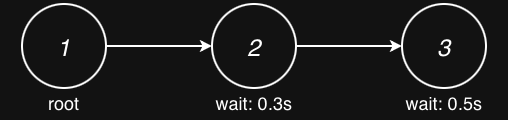
Each SessionNode contains:
id: Node identifier within the sessionwait_after_ready: Delay (in seconds) after dependencies are satisfied
Each SessionEdge contains:
src,dst: Source and destination node IDsis_history_parent: Whether parent’s output should be included in context
A branching session might look like this:
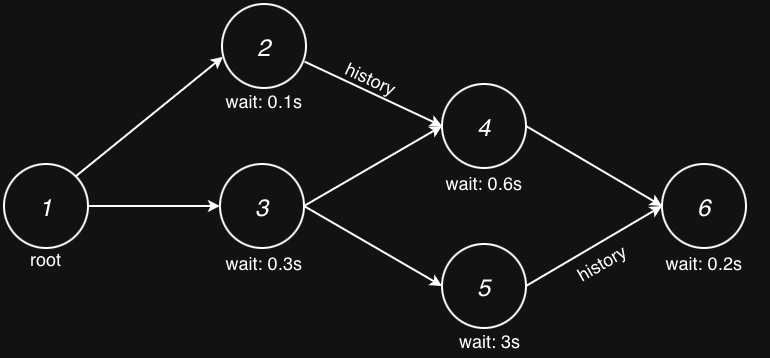
That is, each node has an independent wait_after_ready value and, if enabled, inherits history from one of its parents.
Only after all its parents are finished can a request be considered for dispatch. Next, we talk more about these concepts.
Linear sessions
The most common pattern is a linear session representing a typical back-and-forth conversation:
session_generator:
  type: synthetic
  session_graph:
    type: linear
    num_request_generator:
      type: uniform
      min: 2
      max: 6
    request_wait_generator:
      type: poisson
      arrival_rate: 1.0
    inherit_history: true
Configuration options:
num_request_generatorControls how many turns (requests) each session contains. Supports distributions:
fixed,uniform,zipf,stair.request_wait_generatorControls the “think time” between turns-how long after one request completes before the next is dispatched. Supports:
fixed,poisson,gamma.inherit_historyIf
true, each request includes the conversation history from its parent node(s), simulating chat context accumulation.
History inheritance
When inherit_history: true, the traffic scheduler populates each request’s
history based on edges marked as is_history_parent:
Turn 0: "What is Python?"
    ↓ (history edge)
Turn 1: "What is Python?" → "Python is..." + "Tell me more"
    ↓ (history edge)
Turn 2: [full history] + "Give me an example"
The history is recorded when a request completes and includes:
The request content (prompt)
The response content (model output)
Timing information
This accurately models how LLM chat APIs accumulate conversation context.
Single-request sessions
For scenarios where you need independent requests without any conversation
dependencies, use the single_request graph type:
session_generator:
  type: synthetic
  session_graph:
    type: single_request
This creates sessions with exactly one node and no edges-ideal for:
Isolated API calls
Batch processing scenarios
Simple request/response workloads without multi-turn context
Note how you can still make session root requests share a percentage of prefix by adjusting the channel configuration.
Branching sessions
For complex workflows with parallel paths and dependencies, use the
branching graph type:
session_generator:
  type: synthetic
  session_graph:
    type: branching
    num_layers_generator:
      type: fixed
      value: 4
    layer_width_generator:
      type: uniform
      min: 2
      max: 3
    fan_out_generator:
      type: fixed
      value: 2
    fan_in_generator:
      type: fixed
      value: 1
    single_root: true
    inherit_history: true
Configuration options:
num_layers_generatorControls the depth (number of layers) in the graph.
layer_widthControls how many nodes per layer. Sampled independently for each layer.
fan_out_generatorNumber of forward connections from each node.
fan_in_generatorMinimum incoming edges per node (ensures connectivity).
connection_dist_generator(Advanced) Forward skip distance. Default is 1 (next layer only). Set higher to allow skip connections across layers.
request_wait_generatorControls the “think time” between turns.
single_rootIf
true, forces layer 0 to have exactly one node.inherit_historyWhen enabled, exactly one parent per node is selected as the history provider. This ensures a clean, linear history context even in complex graphs.
This models scenarios like:
Parallel tool calls
A/B testing different conversation paths
Multi-agent interactions
Scatter-gather workflows
Following are two real examples of branching session generated by the branching generator. First, a simpler diamond pattern:
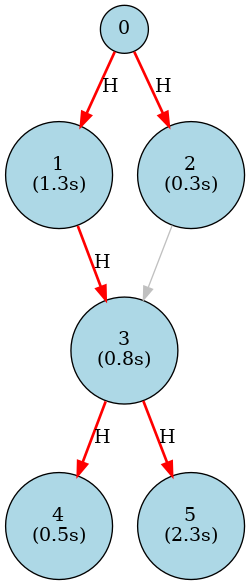
Where H indicates the history parent node, and (n seconds) indicates the wait_after_ready value. It was generated with the following configuration:
session_generator:
  type: synthetic
  session_graph:
    type: branching
    num_layers_generator:
      type: fixed
      value: 4
    layer_width_generator:
      type: uniform
      min: 1
      max: 3
    fan_out_generator:
      type: fixed
      value: 2
    fan_in_generator:
      type: fixed
      value: 2
    single_root: true
And a more complex example with skip connections:
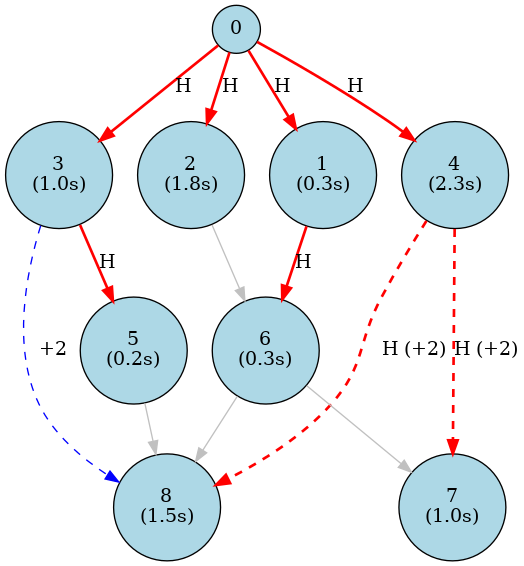
Where dotted edges (+i) indicate a skip connection of i layers. It was generated with the following configuration:
session_generator:
  type: synthetic
  session_graph:
    type: branching
    num_layers_generator:
      type: fixed
      value: 5
    layer_width_generator:
      type: fixed
      value: 2
    fan_out_generator:
      type: fixed
      value: 2
    fan_in_generator:
      type: fixed
      value: 1
    connection_dist_generator:
      type: fixed
      value: 2
    single_root: true
In theory, the branching generator can be used to generate both single-request and linear sessions, but in practice, using the dedicated generators for these cases requires less configuration.
Session generators
Three session generator types are available:
- Synthetic (
type: synthetic) Generates sessions with random but controlled content. Combines:
A session graph generator (linear)
Channel generators for request content
Best for: Load testing with configurable workload characteristics.
- Trace (
type: trace) Replays recorded conversation traces from JSONL files:
session_generator:
  type: trace
  trace_file: traces/timed_synthetic_trace.jsonl
  flavor:
    type: timed_synthetic_session
  wrap_mode: true
See Trace Flavors for the user-facing comparison of trace flavors and example trace shapes.
Best for: Realistic workload replay, production traffic analysis.
- LM-Eval (
type: lmeval) Generates evaluation prompts from lm-eval-harness tasks:
session_generator:
  type: lmeval
  tasks: ["hellaswag", "truthfulqa_gen"]
  num_fewshot: 5
Best for: Model accuracy evaluation under load.
Request scheduling within sessions
When a session is scheduled, its requests don’t all dispatch immediately. The traffic scheduler respects the graph structure:
Root nodes (no incoming edges) are immediately ready
Dependent nodes wait for all parent nodes to complete
After parents complete,
wait_after_readydelay is observedOnly then is the request marked ready for dispatch
This is handled by the ScheduledSessionState class which tracks:
Completed node IDs
Pending node IDs
Per-node completion times and history
The health checker verifies this timing with the “Intra-Session Request Arrival Check” that validates requests weren’t dispatched before their dependencies completed.